
Client video review for freelance editors
How to share a cut with a client, get feedback pinned to exact moments without asking them to make an account, and keep every revision and its comments in one place.
Facts checked
The short answer
Send your client a review link instead of a file. In Seamlift you upload the cut, create a share link with guest comments turned on, and your client watches in their browser and leaves comments pinned to exact moments, without making an account. Each revision is a new version in the same project, with its own comments.
It’s free with 10 GB of storage. You need an account to upload; your clients don’t.
Why client feedback by email goes wrong
The usual routine is a transfer link or a Drive file, then feedback by email or chat. The client writes “the logo bit near the start needs to stay longer” and you go looking for which logo, near which start.
- Notes don’t point anywhere. Without a timecode, every note costs you a scrub through the cut and a guess.
- Feedback scatters. One person replies by email, another on WhatsApp, a third forwards the link to someone you’ve never heard from.
- Revisions blur together. It’s easy to lose track of which note was about v1 and which about v2, and transfer links expire before the client gets to them.
What your client sees
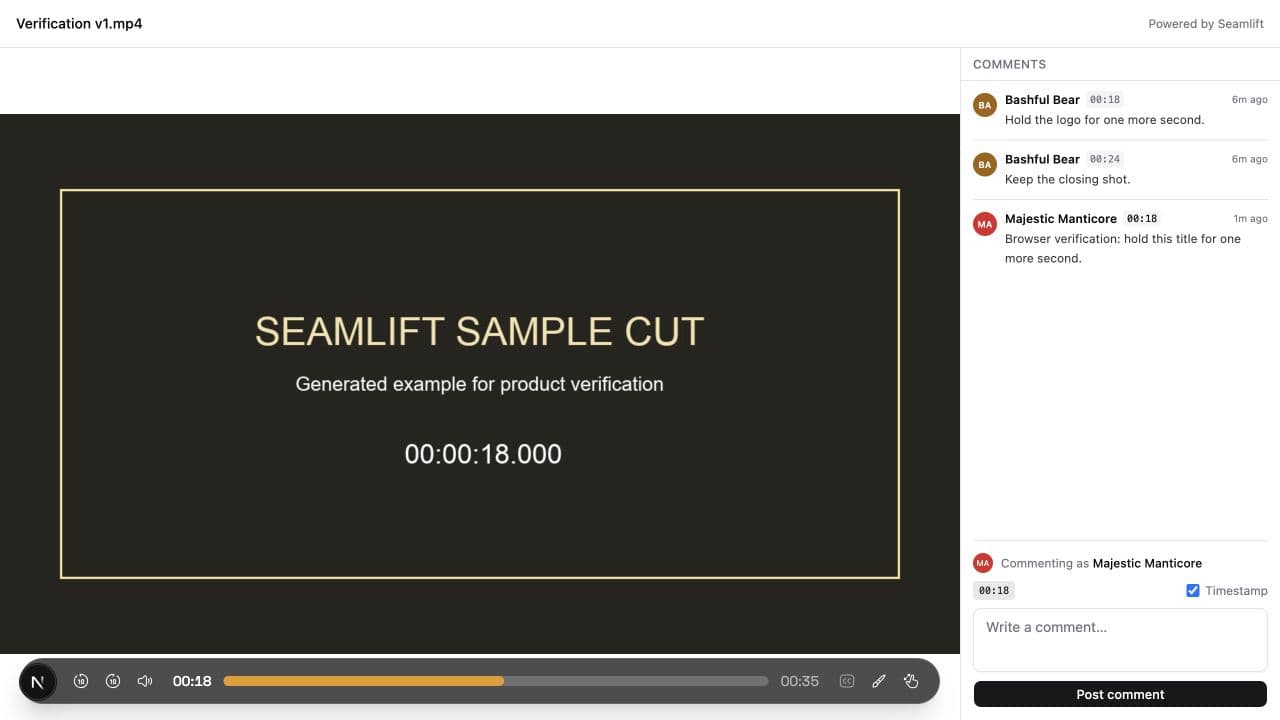
Your client opens the link in any browser, on a laptop or a phone, with nothing to install. They see the player and the comments already left on that version.
With guest comments on, they pause, write and post. Seamlift gives each guest a name like Bashful Bear or Feisty Fox, so you can tell one reviewer from another without anyone filling in a form.
We wrote down exactly what was checked in this flow, and what wasn’t, on the evidence page.
Revisions and versions
Keep v1, v2 and later cuts in one project. Comments belong to the version that was reviewed, so you can check the original note next to the cut it was about.
If you edit in Premiere Pro, the Seamlift panel can send a sequence as a new version. Seamlift then compares two versions: it reads both timelines, shows what changed, and plays both renders side by side in sync, which makes it quick to confirm every note was handled.
When the client signs off, download the final version and deliver it however you usually do. Every version stays downloadable from the project.
Who can see and comment
You decide, per link, whether guests can comment. Anyone with an active link can open that version and read its comments, including someone the link was forwarded to.
Switch a link off and later requests through it are blocked. That doesn’t recall files someone already downloaded, so for sensitive work, share only with the people who need it.
Guest comments aren’t fully anonymous: Seamlift stores a visitor identifier to group each guest’s comments. If you need to know who said what, ask clients to sign their comments.
Getting clearer feedback from clients
The link makes it easy to point at a moment; a short note in your message makes clients actually do it. Ask for the moment, the change and a deadline. For example:
v1 is ready to review. Please leave comments by Tuesday. Pause where you’d like a change and say what it should be, for example “00:18: hold the logo for one more second”.
For more on what makes feedback usable, see 30 examples of video feedback an editor can act on.
Email and transfer links compared with a review link
| What you need | Email, chat and transfer links | A Seamlift share link |
|---|---|---|
| How the client gives feedback | A written list in an email or message | Comments on the video itself |
| Pointing at a moment | Typed or missing timestamps | Each comment’s own timestamp; click to jump |
| Client account | None, but feedback arrives anywhere | None needed with guest comments on |
| Revisions | New file, new thread | New version in the same project, with its own comments |
| Sign-off on record | Somewhere in your inbox | A comment on the exact version that was approved |
What it costs
Seamlift charges for storage and nothing else. Every plan, including the free one, has every feature, unlimited projects and unlimited collaborators. Clients reviewing through a link don’t count toward anything.
- Free: 10 GB, with no card needed to start.
- Paid: add storage 100 GB at a time, at $4 or ₹349 a month each, or $39 or ₹3,399 a year.
Prices show in rupees in India and in US dollars everywhere else, and rupee prices include GST. The pricing page lists every size.
Questions people ask
Do clients need an account to leave video feedback?
No, if you turn on guest comments when creating the share link. Select “Allow anonymous comments” in Share before creating the link. Without that option, clients can watch, but the guest comment form isn’t available.
How do clients leave timestamped comments on a video?
They open the review link, pause the video where they want to discuss something, and write a comment with the timestamp turned on. Posting attaches it to that moment, and clicking its timestamp takes anyone back to that point.
Can clients give anonymous video feedback?
Clients can comment under an automatically assigned guest name without entering a name or making an account. Seamlift stores a visitor identifier to group their comments, so guest access isn’t untraceable anonymity. If you need to know who left a comment, ask clients to include their name.
Will the same review link show my next revision?
No. A share link opens the version it was made for. After uploading a revised cut, create a link for that version and send it. Earlier links keep opening their original cuts until you switch them off or delete those versions.
Who can see a video shared for client review?
Anyone with an active share link can open that version and read its comments, including someone the link is forwarded to. Switching the link off blocks later requests through it, but it doesn’t recall files that were already downloaded.
Is there a free video review tool for freelance editors?
Seamlift’s free plan includes 10 GB of storage, unlimited projects, timestamped comments and share links with optional guest comments. You need an account to upload and manage projects; your clients don’t need one to review through a guest-enabled link. No card is needed to start.
What should I ask clients to include in their feedback?
The moment, the change and a deadline for the round. For example: “Please review v1 by Tuesday. Pause where you want a change and leave a comment. At 00:18, ‘hold the logo for one more second’ gives me enough to make the edit.”
Keep reading
- What we checked in client video reviewDated checks behind this page, with what each one does and doesn’t show.
- How to give video feedback your editor can act on30 vague notes rewritten so they get fixed in one pass.
- Video review for YouTube creatorsThe same workflow from the creator’s side, through to YouTube.
- PricingStorage-only plans in US dollars and Indian rupees.
Timestamped comments and drawings
A comment like “hold the logo for one more second” at 00:18 tells you what to change and where. Clicking its timestamp takes you back to that moment, so you never hunt for it.
Team members can also draw on the frame, reply to a comment in a thread and attach reference files. New comments appear live while you’re watching the same version.
In the player, J and L jump back and forward 10 seconds, K plays and pauses, , and . step one frame, and C pauses and starts a comment.